Tuesday, August 23, 2016

Milky Way Astro over Old Barns & Cribs

Equipment Used: Nikon D750, 24-120mm f4 lense, 35mm f1.8 lense, SB-700 Speedlights, led flashlight, Vanguard Abeo Plus 363 CT Tripod & Viltrox Wireless Remote Control

The Exsate Golden Hour app on my phone says “Someone told you the most beautiful stars are in August? You have to check!” I ventured out to see if this was true from August 1 – 3 when the sky was clear between 10:30 to well after midnight. I traveled to four different locations to capture the Milky Way.

The D750 was fitted with the 24-120mm at f4 and the 35mm at f2. It was the first time I used the 35mm lense to capture the stars and I was pleased with how much light it gathered but need to fine tune the manual focusing. The camera was placed on my new tripod that is sturdier than my previous one and also easier to set up in the dark. Settings on the camera were manual mode with exposures ranging from 10 to 30 seconds at ISO 3200-8000 with VR off on the lense and high iso nr set to low. For the best in post processing and enlarging the files, RAW was used as well. While my camera was exposing for the milky way, I used the SB-700 in manual mode to throw bursts of light at the foreground which included the barns I was trying capture.

Capture NX-D processed the RAW files into Tiffs with adjustments to enhance the image. Exposure compensation was increased while white balance was either left alone or changed to direct sunlight or incandescent. The picture control was changed to vivid or landscape or also left alone. The contrast, saturation and shadow sliders were adjusted if needed. Lastly, I clicked on the astro noise reduction button to help reduce the noise in the sky.

In PSE 11, I first cloned out unwanted objects such as a line of light from a plane in the sky or a lightening bug flying through the image. Additional enhancements included contrast, saturation, brightness and levels layer masks brushed into certain areas of the image. The unsharp mask filter was used to sharpen the image after cropping and straightening once all the adjustments were done.

I took two different series of images to combine into star trails using StarStaX which lasted about 10 minutes between the first and last image took using the interval timer on the camera. The time between each shot was five seconds. It sure seems like a longer time when you are setting in the dark. Hopefully in the future, I’ll be able to do an image that is a few hours long which would allow the star trail to start on one side of the image and finish on the other side.

With these images complete, I have to say I agree with the Exsate Golden Hour app has the stars and Milky Way shine bright in these photographs and I’m very happy with how they turned out. The D750 continues to impress me with its ability to capture the scene. 

#1.

#2.

#3.

#4.

#5.

#6.

#7.

#8.

#9.

#10.

#11.

#12.

#13.

#14.

#15.

#16.

#17.

#18.

#19.

#20.

#21.

#22.

#23.

#24.

#25.

#26.

#27.

#28.

#29.

#30.

#31.


Sunday, July 31, 2016

Lake Panorama's 4th of July Fireworks 16

Equipment Used:  Nikon D750, 24-120 f4 lense, Silk Pro 500DX Tripod & Viltrox Wireless Remote control

Over the 4th of July weekend, Lake Panorama had their firework show so I headed down to Boulder Beach with my camera and got to the point along the shore to get a good view. Last year I was at the same location and had some good images so hoped for more of the same this year. I had planned on using both the D750 and D90 on tripods but when I started sitting up the equipment, I didn’t have both tripod plates.

So I put the D750 on the Slik tripod fitted with the 24-120 mm lense and hooked up the remote control as well. Manual focus was used along with turning off VR on the lense. Manual mode was set to bulb and I adjusted the aperture between f5.6-9.  ISO was 400.  Exposures ranged from 5 to 15 seconds to capture the fireworks.

I started processing the images in Capture NX-D with adjustments to exposure compensation, white balance, picture control and highlight/shadow sliders. White balance was changed to direct sunlight and picture control to landscape. I increased the shadow slider to help lighten up the area of the boats on the water. I also made a copy of the RAW file to further lighten up the area of the boats using the exposure compensation.

Using PSE 11, I merged files together using layers and the brush tool to help get a great looking firework burst along with the boats being exposed in a better manner. After that, I used the clone brush tool to get rid of unwanted objects such as a cell phone towers red light in the background. I than straightened the image if need be and sharpened it as well.

The sky wasn’t quite as good for taking firework shots as last year it seemed when viewing these images but I still was able to capture some cool bursts. Next year I’ll be looking for a new location to shoot from to hopefully get more of a look down towards the boats. 

#1.

#2.

#3.

#4.

#5.

#6.

#7.

#8.

#9.

#10.

#11.

#12.

#13.

#14.

#15.


Saturday, June 25, 2016

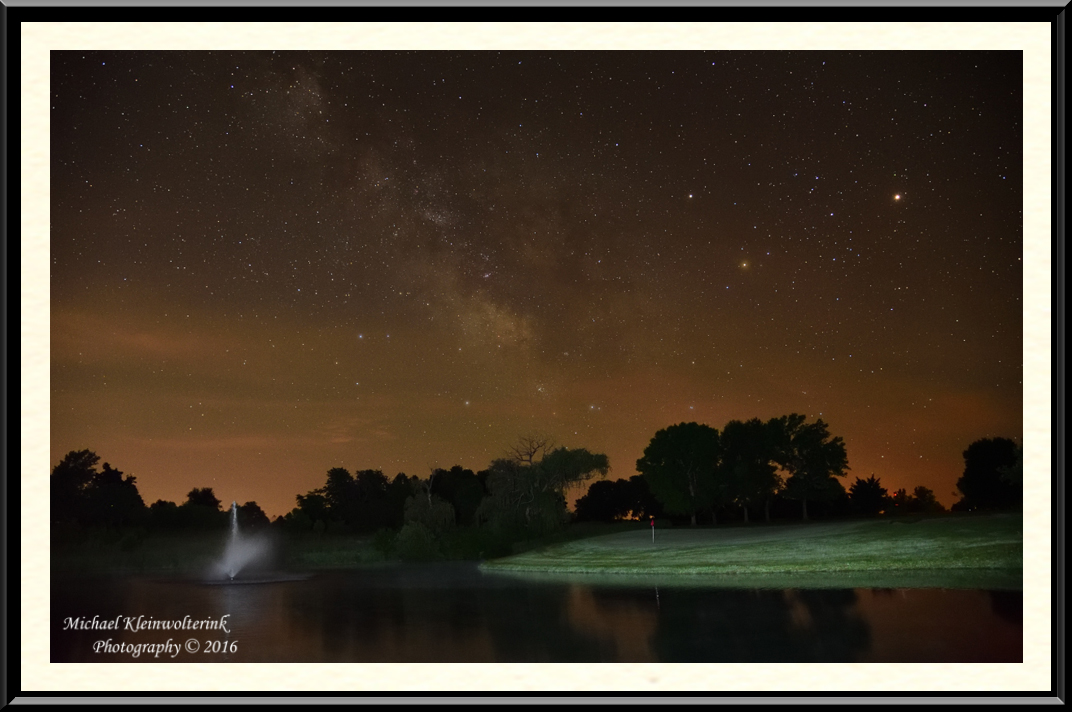
Milky Way over Lake Panorama National G.C.


Equipment Used:  Nikon D750, 24-120 f4 lense, SB-700 Speedlights, Silk Pro 500DX Tripod, Viltrox Wireless Remote control & Vello FreeWave Flash triggers.

A goal for this summer was to get out at night on the golf course when the sky was clear, the moon was down and the stars were bright. I wanted to expose the golf hole along with the starry sky. I was able to accomplish this goal at the end of May and the beginning of June. I set out with my camera gear starting at 11 pm and shot until 2 or 3 am.

The D750 was fitted with the 24-120mm f4 lense with VR and auto focus shut off since I shot everything from the 500DX tripod. Aperture was at f4 in manual mode with bulb as the shutter speed. The Viltrox remote control or the interval timer on the D750 was used to control the length of exposure. ISO ranged from 3200-8000 while the exposures ranged from 10 seconds to close to a minute.

My pair of SB-700 Speedlights fitted with Vello FreeWave flash triggers were used to throw light on the golf hole. I set them to manual power so I could make adjustments and walked around throwing bursts of light by pushing the Vello remote while the camera was exposing for the stars. This took alittle experimenting to figure out the right power and angle to expose the hole.

Processing these starry images started in Capture NX-D by adjusting the white balance to flash or direct sunlight or leaving it alone. The picture control was changed to landscape and the astro noise reduction feature was selected. Minor adjustments to exposure compensation and contrast/saturation sliders were also made to help bring out the stars.

In PSE 11, I first cloned out unwanted objects such as water hazard and yardage stakes. On some images, I combined the sky with a different exposure for the hole so I used layer masks and the brush tool to accomplish that. The majority of the images, however, I didn’t need to do that. To help brighten the stars more, I used a glowing edges filter on the top part of the image. The unsharp mask filter was used to sharpen the image after cropping and straightening once all adjustments were done.

I used StarSta X to create the star trails on hole #15 by combining multiple images into one to illustrate the rotation of the Earth in just a short amount of time. I started taking the first shot at 1:27 am and the last one was at 1:35 am so in that amount of time, the Earth rotated the length of the star trail.

I had a lot of fun shooting this series of images in the dark and think they turned out great. I’ve yet to order my favorites on metal but will be doing that shortly as they should look awesome.  I’ll be waiting for the next opportunity to capture images like these the rest of the summer.

#1.

#2.

#3.

#4.

#5.

#6.

#7.

#8.

 #9.

#10.

#11.

#12.

#13.

#14.

#15.

#16.

#17.